← DigIn blog
Project · 2026
A photo of a storybook page → an illustrated listening story
Picture Stories turns one photograph of a Chinese picture-book page into a small
static site. The text is read from the page, translated into English and Dutch, split into
sentences with pinyin, illustrated in a consistent style, spoken by two Chinese voices, and
published with a player that behaves like a tiny video app — without any video.
live
1 story · 21 sentences
7 scenes · 2 voices
AI: deepseek-flash · qwen-image-3.0 · qwen3-tts-flash
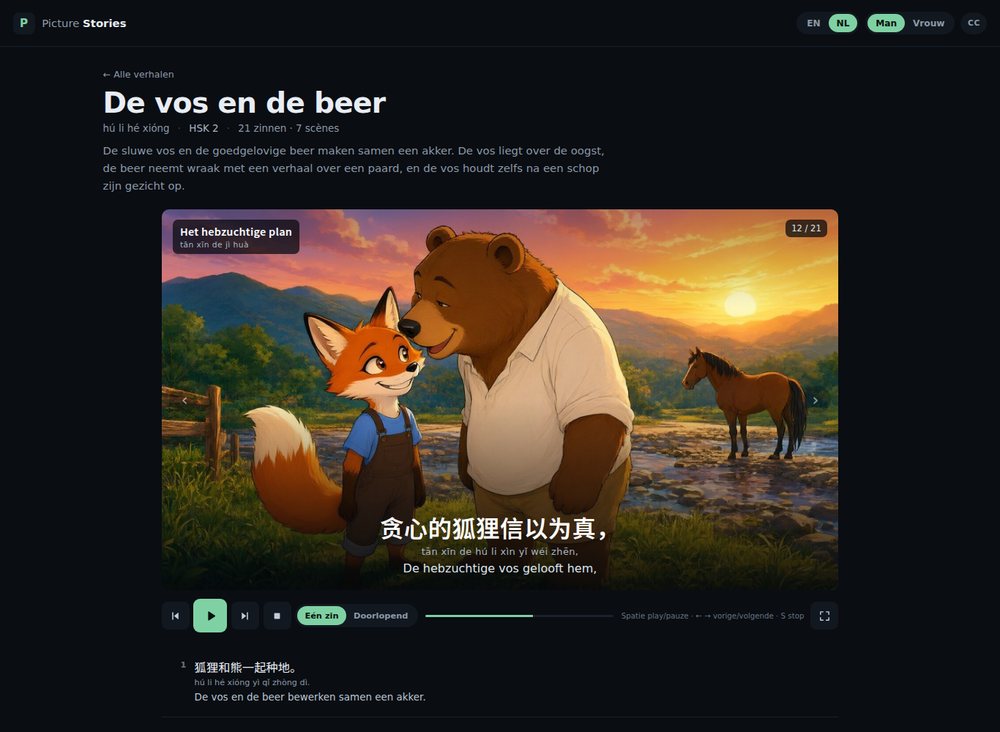
The player for The Fox and the Bear — scene 4, sentence 12, Dutch interface. The stage stays put while the sentence list scrolls underneath it.
What it is
Picture Stories · Chinese picture books as listening practice
Every story starts as a photo of a page. The Chinese text is transcribed in reading
order, split into sentence cards, and translated into English and Dutch. The illustrations
in the book are not copied: a new set is drawn in the same warm, thick-paint style as
the YouTube lessons, with a character sheet to keep faces and clothes consistent. Every
sentence is recorded in a male and a female Chinese voice. The result is one self-contained
index.html per story, plus a library page with one card per story.
Photograph in, story out
The input is deliberately narrow: one photo of one page. The page is read for its
text only. Its layout, its printed drawings and its colour are ignored — they belong to the
book, not to the site. The pinyin printed above the characters is copied, not regenerated;
only when a page has no pinyin does the pipeline generate it and check the tones.
One printed line becomes one sentence card. That sounds simple, but it is the step that
decides everything downstream: a misread character is repeated in the translation, the word
chips and the explanation. The skill therefore asks the agent to re-read the transcription
against the photo once, character by character, before spending any money on images or
speech.
How it is put together
1
Read the pageThe agent transcribes the Chinese text and the printed pinyin. One line per sentence, punctuation and curly quotes preserved. The book's artwork is explicitly ignored.
2
Translate and explainEvery sentence gets an English and a Dutch translation, 3–6 word chips (hanzi, pinyin, meaning in both languages), and a short explanation: story, words, grammar, pronunciation.
3
Design the scenesThe story is divided into 4–8 scenes. Each scene has a Chinese title, pinyin, English, Dutch and a prompt that says exactly who may appear in the frame.
4
Draw the setFirst a character sheet on a neutral background, then the 16:9 scenes with that sheet as reference. Same characters, same clothes, same warm light. A scene is redrawn at most three times.
5
Record two voicesqwen3-tts-flash renders every sentence twice: Ethan (male) and Cherry (female), at a calm read-aloud pace. Each clip is one mp3.
6
Build and publishA Python builder embeds the story data into a self-contained index.html. The library is rebuilt, the story is written into /srv/cn/pdf, and a headless browser checks audio, language, scene images and the cinema overlay.
The player is not a video
There is no video file, no video-list-dark.html and no video element. Each
story is one index.html with the text embedded, so it works on any static host
and even from file://. The player has:
- a sticky 16:9 stage with one illustration per scene, the scene title and the counter;
- Chinese, pinyin and the current translation, switchable independently with the
CC menu (including “hide cards” and “hide image info” for small screens);
- one play/pause, previous, next and stop in a flat transport bar, plus a one-sentence /
continuous segmented switch;
- a cinema button that turns the page into a fixed full-screen overlay — the image
is contained, the controls float on top, and F / Escape toggle it. It
is a CSS overlay rather than
requestFullscreen(), so it also works on iPhone
Safari;
- a per-sentence list where clicking a card opens its word chips and explanation and pins
that card directly under the transport, while the list scrolls behind the stage.
English is the default; every title, translation, word and explanation also exists in
Dutch. The choice is remembered per browser.
What runs where
| Piece | Role |
|---|
| nginx | Serves the static site at ai.digin.be/pdf/; dot-directories such as the skill folder are blocked. |
| Static files | One index.html per story, a library page, a stories.json, scene JPEGs and per-sentence mp3s. No database. |
photo-story-lesson | The skill: checklist, 12 scripts and the player/library templates. It lives locally and in /srv/cn/pdf/.dsh/skills/photo-story-lesson on the VPS. |
| qwen-image-3.0 | Character sheet and 16:9 scene illustrations, 1536×864, about $0.03 per image. |
| qwen3-tts-flash | Two Chinese voices per sentence. |
| Headless Chrome | Play, switch language, switch voice, hide cards, open cinema, verify the image really loaded and capture a screenshot. |
What the AI decides, and what stays fixed
The agent reads the photo, writes the translation and explanation, designs the scenes and
calls the image and speech models. It does not decide the structure: the data schema, the
player layout, the file names, the one-story-per-folder rule and the checks are fixed in the
skill. That is why a new story still looks and behaves like the previous one.
The visual style is fixed too. The reference set is the seven illustrations of
The Fox and the Bear: thick-paint 2D animation, detailed environments, warm golden
light, soft dark outlines. A new story gets the same treatment, not a new art direction.
Limits, and the next step
A photo still has to be readable. If a character is blurred or the pinyin is
missing, the pipeline stops and asks instead of guessing. The page's own drawings are never
used; only the text is taken from the book.
The build path is now a dedicated page: /pdf/builds/new.
Uploading one photo is enough. DeepSeek Flash reads the title, the Chinese text and the
printed pinyin, translates the title into English and Dutch, picks a slug, and the headless
agent then takes over with the skill. Titles, slug, level and a manual transcription can be
overridden under “optional overrides”; a dry-run checkbox stops after the transcription. The
page uses the same builder login as the YouTube builds and runs one job at a time.
Try it: Build a Picture Story →. The dry-run
checkbox stops after the transcription and opens an OCR checklist (lines, pinyin coverage,
merged sentences, title). If it looks right,
Approve & build reuses the same photo and
transcript without a second OCR; if not, paste a corrected text in the manual transcription
field and build again.
The page's own drawings are still never used, and the agent still refuses to guess: if the
photo is unreadable, fix the transcription first. The skill, the player and the publishing path
stay the same.