A podcast channel is turned into a small website where every sentence can be
played on its own, read with pinyin, explained in Dutch and English, and illustrated with a
drawn scene. One URL goes in; a finished lesson comes out.
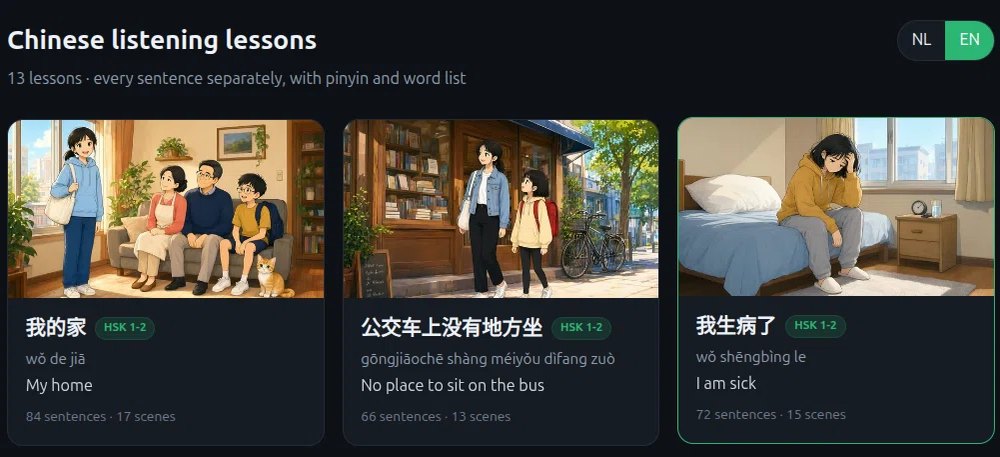
The stories page — every lesson gets its own illustration, pinyin and sentence count.
What it is
EasyChineseMinutes · Chinese listening practice
Each video from the channel becomes a lesson: the audio is cut into one clip per sentence,
every clip gets a button, and a sticky stage shows the current scene with the Chinese line
underneath. A switch flips the whole page between Dutch and English — including the
explanation and the translation line under the pinyin.
How it is put together
Everything runs on one small VPS. A form on the builds page takes a YouTube URL, a queue
worker starts a background agent, and the agent walks a fixed pipeline that is written down
as skills — small folders with a checklist, scripts and examples.
1
InputA URL from the channel playlist, pasted on the builds page. The form checks it: valid video id, still in the playlist, not built before, not already queued. Login required.
2
Agent + skillsA headless DeepSeek agent (DSH) starts in the channel folder. It loads the project skills from .dsh/skills: orchestrator, download, cut, words, scenes, TTS, player, overview. Each step has a script and a check.
3
Mediayt-dlp downloads audio and the zh/en subtitles; ffmpeg cuts one mp3 per sentence per voice; qwen-image-3.0 draws the scenes (13–20 per lesson); qwen3-tts-flash speaks every sentence in a male and a female voice.
4
WritingThe agent writes the word chips, the per-sentence explanation in Dutch, and the English explanation and translation. These live in zinnen.json and are embedded into the player HTML.
5
PublishThe player, the lesson tile and state.json are written straight into the website folder — no deploy step, the site is the output folder.
6
ChecksAfterwards a real headless Chrome opens the new lesson, clicks play, verifies the audio actually runs, reads the English line and captures a screenshot. Failures show up in the build report.
What runs on the box
| Piece | Role |
|---|
| nginx | Serves the static site, terminates TLS (Let's Encrypt, auto-renew), and puts the write endpoints behind a password. |
cn-builder | The build form, the queue and the log viewer. One build at a time; a second URL waits. |
cn-session | Every 8 seconds it writes builds.json: what is running, which phase, the counters, the timeline and the cookie status. |
dsh headless | Node 22 + DeepSeek Harness. The agent that actually does the work, one process per build. |
| Chrome | Puppeteer + Chrome for Testing, used only for the post-build browser check. |
| certbot | Systemd timer that renews the certificate. |
Data, in plain files
No database. A lesson is a folder: les-…/ with zinnen.json (sentences,
pinyin, words, explanations), scenes.json (scene bands), audio/ (four
voices per sentence), bg/ (illustrations) and the player HTML. The channel keeps
stories/state.json — the list of built videos, which doubles as the duplicate check.
What the AI does, and what it does not
The agent writes the explanations and translations, designs the scenes, and calls the image
and speech models. It does not decide the structure: the player layout, the checks, the naming
and the publishing rules are fixed in the skills and in the scripts. The browser check exists
precisely because the agent cannot see its own result.
Known limits: YouTube blocks datacenter IPs, so a valid cookies.txt
is kept on the server and its expiry is shown on the builds page. The agent model has no image
input, so illustrations are checked by a human, not by the agent. Each lesson costs about
$0.50–1.00 in image and speech credits.
Why skills
The pipeline is the same every time, so it is written down instead of remembered: a folder
per step with a checklist, the scripts it needs, and the common mistakes. A new video, or a new
channel, is mostly configuration — the knowledge stays in the repository, not in a chat.